Clickable / For people new at work
Find a purchase order without asking your manager
Company software is dense: tiny toolbars, menus with nearly the same name. Clicky points at the right one, and when two could fit, it asks which you mean instead of guessing.
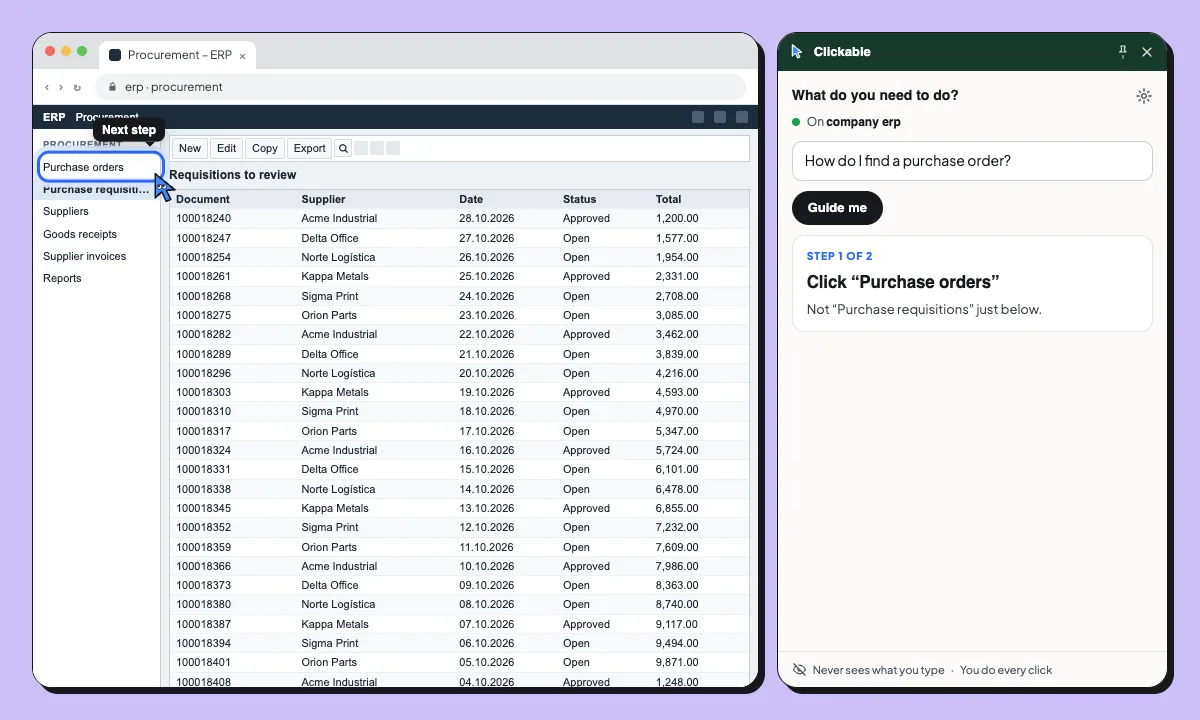
- You ask: “How do I find a purchase order?”
- Clicky asks: “Purchase order or requisition?” You pick: “Purchase order”
- Step 1 of 2: Click “Purchase orders”. Not “Purchase requisitions” just below.
- Step 2 of 2: Click the magnifier in the toolbar. It’s the small button with a magnifier.
- You’re in the purchase order search. Type the order number there.
Asks when it’s unsure. Two menus with nearly the same name? Clicky asks which one you mean instead of guessing. Learn the company software without asking your manager.
Common first-month tasks
Find a purchase order
Tell purchase orders from requisitions and find the search in the toolbar.
Submit an expense claim
Find the expenses form and the right category. You fill it in and submit it yourself.
Request time off
Find the absence request in the HR system and the right type of leave.
Your company’s data stays in its systems
Clickable reads the page’s labels and a short excerpt of its text to find the way. What you type is never sent, and it never acts on its own: you do every click.
- Never sends what you type or your passwords
- Pauses on Cl@ve, Google, Microsoft and GOV.UK sign-in
- Never clicks, submits or pays for you
Questions
Does it work in SAP, Workday or Salesforce?
If it runs in Chrome, Clickable can guide you on it. It reads each page live, with no setup for each app.
What if two menus look the same?
Clicky asks which one you mean, with short options to choose from, before it points at anything.
Can my company roll it out to everyone?
Managed deployment, single sign-on and analytics are on the Enterprise roadmap. See the Enterprise page for each feature’s status.
Does it change anything in our systems?
No. It never clicks, types or submits. It only shows you where to click.
Your first month, less lost
Free to start. For your whole team, talk to us about a pilot.