Clickable / For parents and grandparents
Help mum with her pension, without the phone call
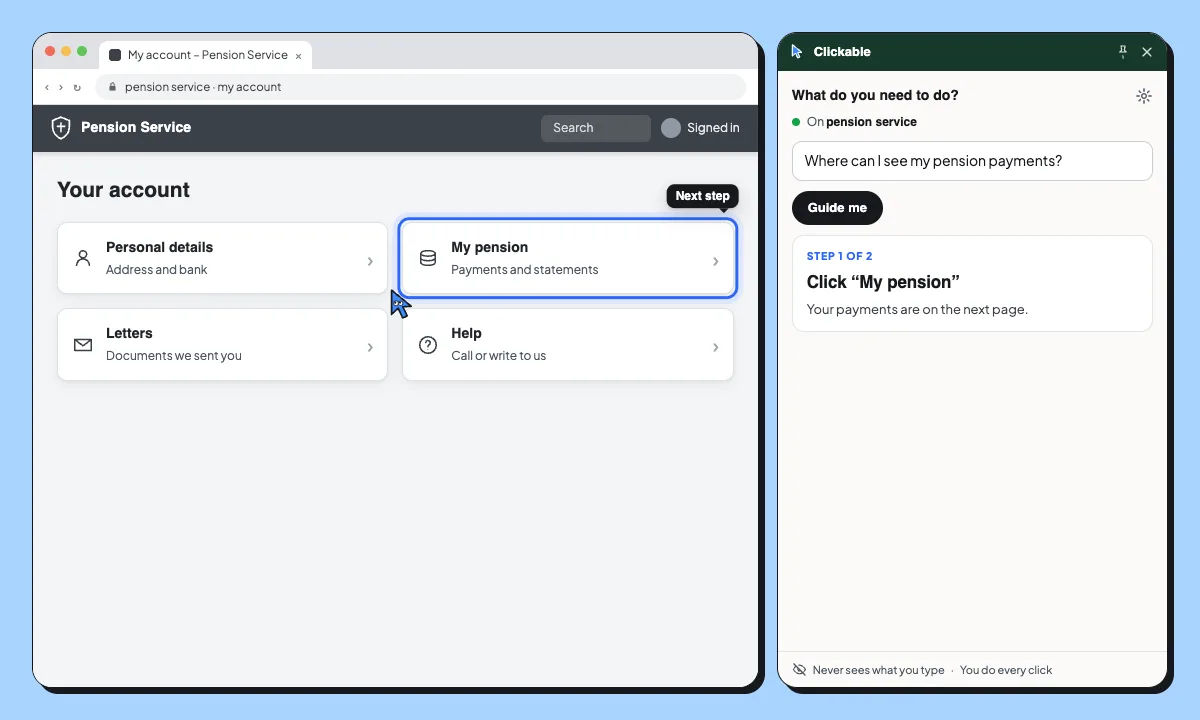
Clickable shows the next button to click, in clear, calm steps. Your parents ask in their own words and do every click themselves, so they learn the site instead of waiting for you.
- You ask: “Where can I see my pension payments?”
- Step 1 of 2: Click “My pension”. Your payments are on the next page.
- Step 2 of 2: Click “Payments”. It’s the second tab.
- That’s your next payment. 25 November: €1,180.40.
One step at a time. One clear instruction in plain words, right on the button to press. Nothing to learn first. Done by herself. No phone call.
Things they can do on their own
Check a pension payment
Find the next payment date and amount on the pension website.
Download a bank statement
Get last month’s statement as a PDF, for the gestor or for their own records.
Book a doctor’s appointment
Find the booking page on the health portal and pick a time.
Safe on the websites that matter
Clickable points; it never clicks, types or pays. What they type and their passwords are never sent, and it pauses on Cl@ve, Google and Microsoft sign-in so they sign in themselves.
- Never sends what you type or your passwords
- Pauses on Cl@ve, Google, Microsoft and GOV.UK sign-in
- Never clicks, submits or pays for you
Questions
Is it hard to set up?
You add it to Chrome on their computer, pin it to the toolbar and that’s it. No account is needed for the free tasks.
Is it safe on their bank’s website?
Clickable only points: it never clicks, types or pays. What they type and their passwords are never sent, on any site.
Will it press buttons for them?
No. Clickable only shows where to click. They do every click themselves, so nothing happens without them.
What if it points at the wrong thing?
They press “Not this” and Clicky picks something else. “Start over” begins again with a new question.
Does it work on a tablet or phone?
Not yet. Clickable works in Google Chrome on a computer.
Fewer Sunday calls
Set it up on their laptop in a minute. Free to start.