Clickable / For people new to Spain
Book your residence appointment without reading Spanish
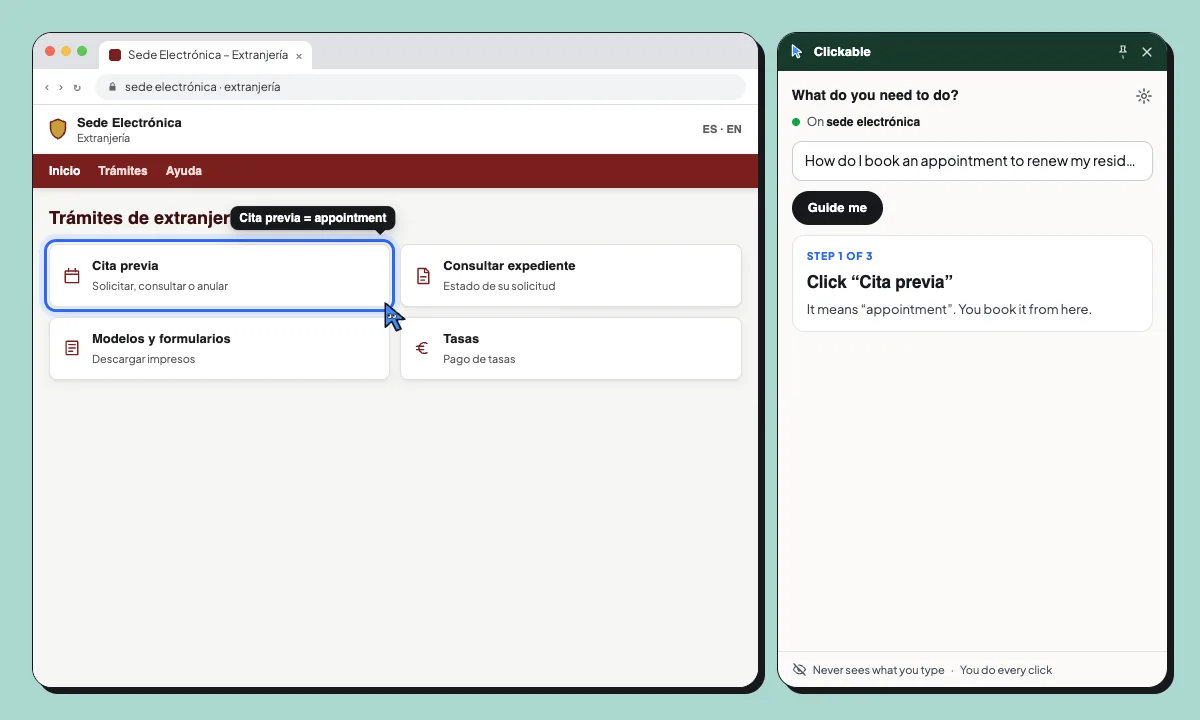
Ask in English, Arabic, Ukrainian or any language. Clicky answers in yours and points at the Spanish button: “Cita previa”, “Trámites”, “Acceso”. You do every click.
- You ask: “How do I book an appointment to renew my residence?”
- Step 1 of 3: Click “Cita previa”. It means “appointment”. You book it from here.
- Step 2 of 3: Click “Cl@ve PIN”. You’ll sign in on the Cl@ve website.
- Sign in yourself, I’ll wait. I don’t read the Cl@ve sign-in. I’ll carry on when you’re back.
Ask in your language. The site stays in theirs. Ask in English or any language. Clicky answers in yours and points at the Spanish button. You don’t need to read Spanish to book it.
Common tasks for newcomers
Book a cita previa for extranjería
Find the appointment page, the right office and the right procedure.
Get your padrón certificate
Find the online certificate on your town hall’s website.
Download your vida laboral
Find the work history report on the Seguridad Social website.
Your NIE and passport stay yours
What you type is never sent, so your NIE, passport number and address stay in the form. It pauses on Cl@ve sign-in: you sign in, it waits.
- Never sends what you type or your passwords
- Pauses on Cl@ve, Google, Microsoft and GOV.UK sign-in
- Never clicks, submits or pays for you
Questions
Does it translate the website?
It doesn’t translate the whole page. It tells you, in your language, which Spanish button to click next and what it means.
Can it get me an appointment faster?
No. Clickable shows you where to click; it can’t create appointments or skip queues. Availability depends on the office.
Does it work with Cl@ve?
Clickable shows you the way to the Cl@ve button, then pauses on the Cl@ve sign-in itself. You sign in yourself, and it carries on when you’re back.
Does it give legal advice about my permit?
No. It shows where to click, not which permit or option applies to you. For that, ask an adviser or the official help.
Which languages can I use?
Any language you can type in. Clicky answers in the language you ask in.
Spanish paperwork, in your language
Free to start. Try it on your next government website.