Clickable / For small businesses and freelancers
Download last month’s invoices in 3 minutes
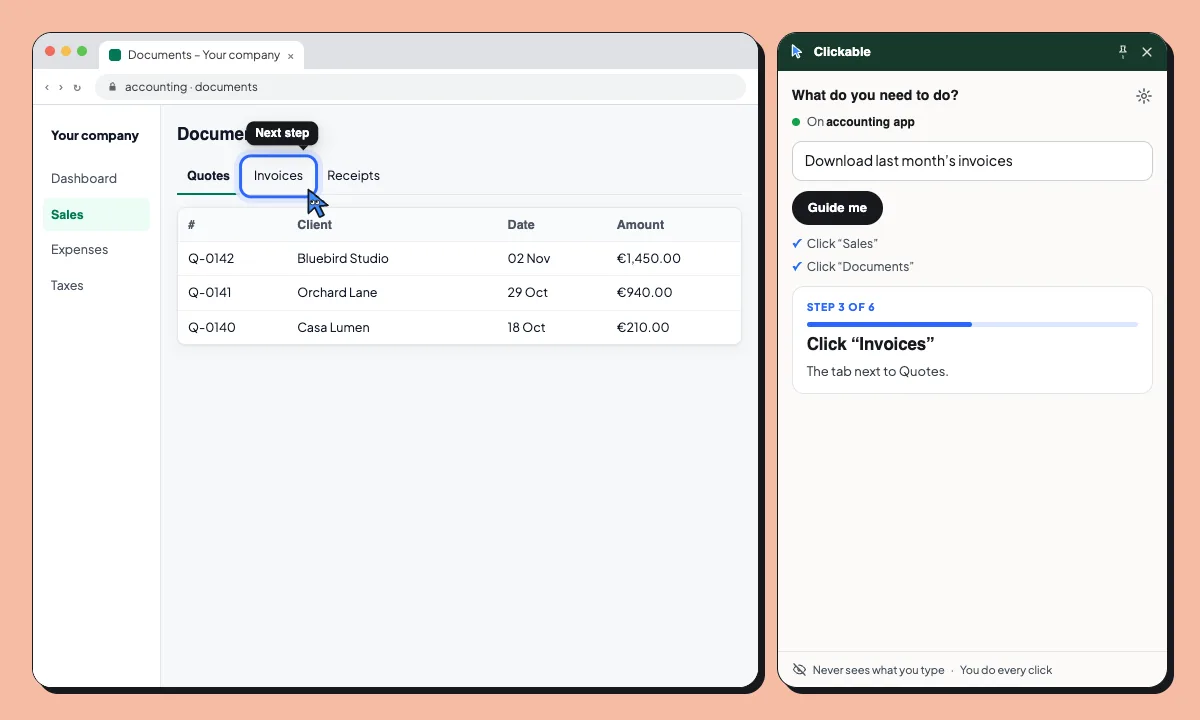
The tasks you do once a month are the ones you forget. Ask Clicky and it stays with you across pages: the right tab, the filter, the select-all box, the download button.
- Step 3 of 6: Click “Invoices”. The tab next to Quotes.
- Step 4 of 6: Click “Last month”. Only October’s invoices stay in the list.
- Step 5 of 6: Tick the box to select all. It’s at the top of the list.
- Step 6 of 6: Click “Download”. All four invoices come in one file.
- Done. Your four October invoices are downloading.
Stays with you across pages. The page changes behind the panel. Clicky keeps track of where you are and what comes next. Month-end in 3 minutes.
Common month-end tasks
Export last month’s invoices
Find the filter, select them all and download them in one go.
Find a tax form on the tax agency website
Go to the right section of the Agencia Tributaria website, then fill it in yourself.
Download a bank certificate
Find the certificate your accountant asked for in your bank’s portal.
Your figures stay in your accounts
Clickable reads the page’s labels and a short excerpt of its text to find the way. What you type is never sent; it never submits a form and never pays.
- Never sends what you type or your passwords
- Pauses on Cl@ve, Google, Microsoft and GOV.UK sign-in
- Never clicks, submits or pays for you
Questions
Does it work with my accounting software?
If it runs in Chrome, Clickable can guide you on it. It reads each page live, so there’s nothing to set up per app.
Will it file my taxes?
No. Clickable shows where to click; it never submits, signs or pays. It doesn’t give tax advice either.
How many tasks do I get?
Free gives you up to 3 guided tasks a month. Plus gives you up to 150.
Can my employees use it?
Yes, each with their own Chrome. For teams, see Clickable Enterprise.
Month-end, minus the hunting
Free to start. Try it on your next invoice export.