Clickable / For patients
See your test results without the maze
Health portals bury results under menus and tabs. Ask Clicky where they are and it shows you the way, one click at a time. What you type stays private.
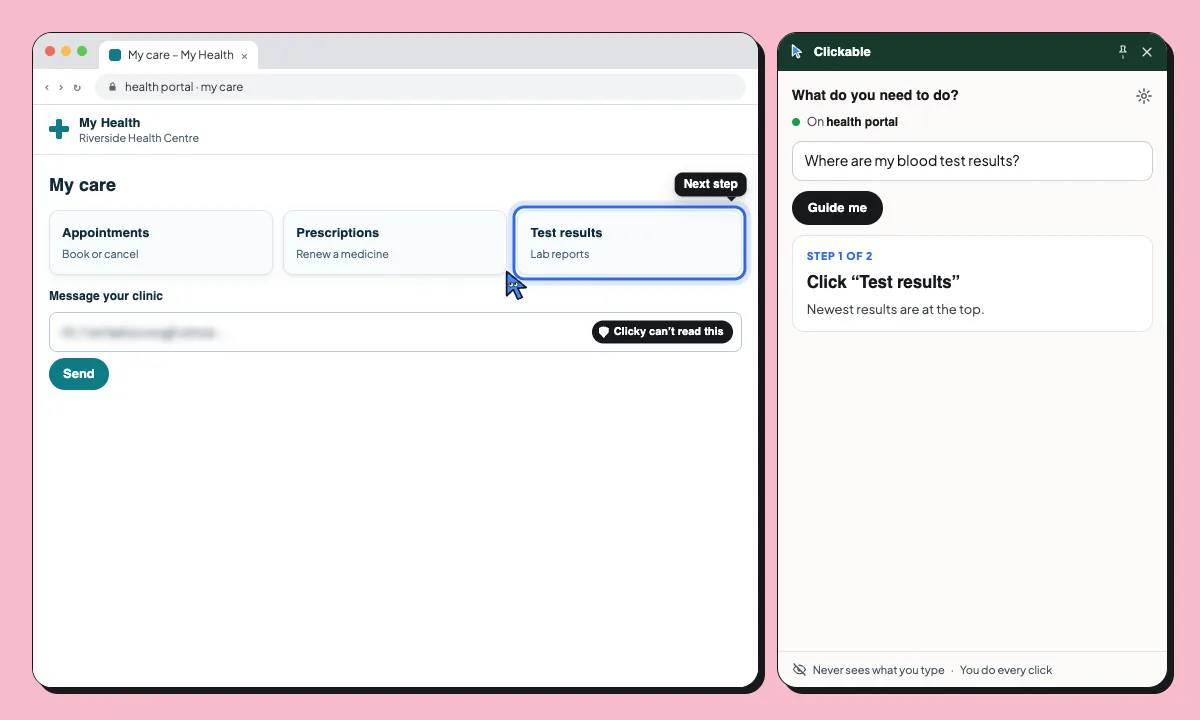
- You ask: “Where are my blood test results?”
- Step 1 of 2: Click “Test results”. Newest results are at the top.
- Step 2 of 2: Click “Full blood count”. It opens the lab report.
- There’s your full blood count report.
Privacy you can see. Clicky reads the page’s labels to find the way. What you type and your passwords are never sent. What you type stays yours.
Common health portal tasks
Find your latest test results
Go straight to the lab reports, newest first.
Book or cancel an appointment
Find the appointments page and the right option.
Renew a prescription
Find the repeat prescription request. You confirm it yourself.
Privacy you can see
Clickable reads the page’s labels and a short excerpt of its visible text to find the way. What you type into the portal and your passwords are never sent, and it pauses on Cl@ve, Google, Microsoft and GOV.UK sign-in.
- Never sends what you type or your passwords
- Pauses on Cl@ve, Google, Microsoft and GOV.UK sign-in
- Never clicks, submits or pays for you
Questions
Can Clickable read my results?
When you ask for help it reads the buttons, links and labels on the page and a short excerpt of its visible text, to find the way. It never reads what you type or your passwords.
Does it give medical advice?
No. Clickable shows where to click. For what your results mean, ask your doctor.
Does it work with my health service’s portal?
It works on most websites in Chrome, including health portals. It reads each page live.
Will it book appointments for me?
No. It shows you where to click; you choose and confirm the appointment yourself.
What you type stays yours
Free to start. Try it on your health portal.