Clickable / For parents
Find the school meeting in 2 clicks, not 20 minutes
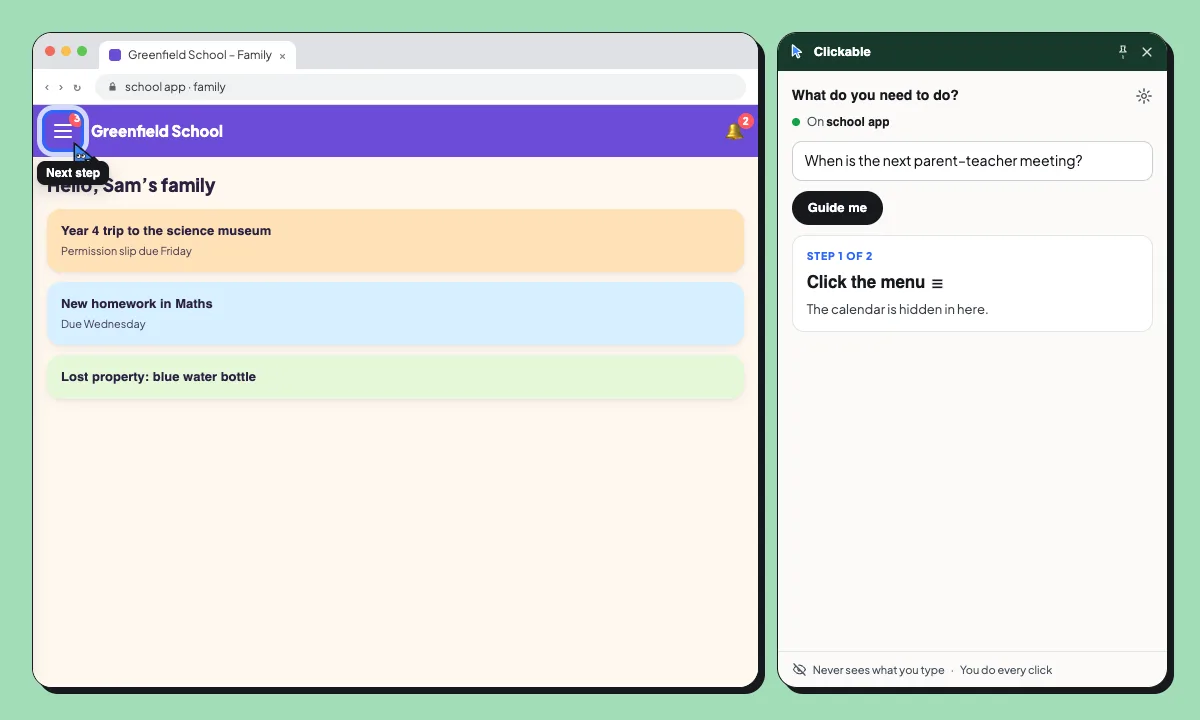
School portals hide everything behind menus. Ask Clicky what you need and it opens the way: the ☰ menu, the right tab, the date on the calendar.
- You ask: “When is the next parent–teacher meeting?”
- Step 1 of 2: Click the menu ☰. The calendar is hidden in here.
- Step 2 of 2: Click “Calendar”. Meetings are on the month view.
- The meeting is on Thursday 12, at 17:30. It’s on the school calendar.
Digs into hidden menus. Clicky knows what’s behind the ☰ and the “More” buttons, and opens the way for you. Found in 2 clicks, not 20 minutes.
Common school tasks
Find the next parent meeting
Go from the home feed to the calendar entry, even when it’s inside a hidden menu.
Report an absence
Find the absences form and the right option for a sick day.
Sign a permission slip
Find the trip notice and the button to give consent. You click it yourself.
Your family’s details stay with you
Clickable reads the page’s labels and a short excerpt of its text to find the way. What you type is never sent, and it pauses on Cl@ve, Google and Microsoft sign-in.
- Never sends what you type or your passwords
- Pauses on Cl@ve, Google, Microsoft and GOV.UK sign-in
- Never clicks, submits or pays for you
Questions
Does it work with our school’s portal?
It works on most websites in Chrome, including school portals. It reads each page live, so it doesn’t need to know your school in advance.
What about the school’s phone app?
Clickable works in Chrome on a computer. If your school has a website version, open it there.
Can I ask in my own language?
Yes. Ask in any language; Clicky answers in yours, even when the portal is in another one.
Does it fill in forms for me?
No. It shows which field or button comes next. You type and click yourself.
Less time in the school app
Free to start. Try it on the next notice you can’t find.