What is Clickable?
Updated
Clickable is a Chrome extension that shows you where to click on any website, one step at a time. You make every click; it never acts for you.
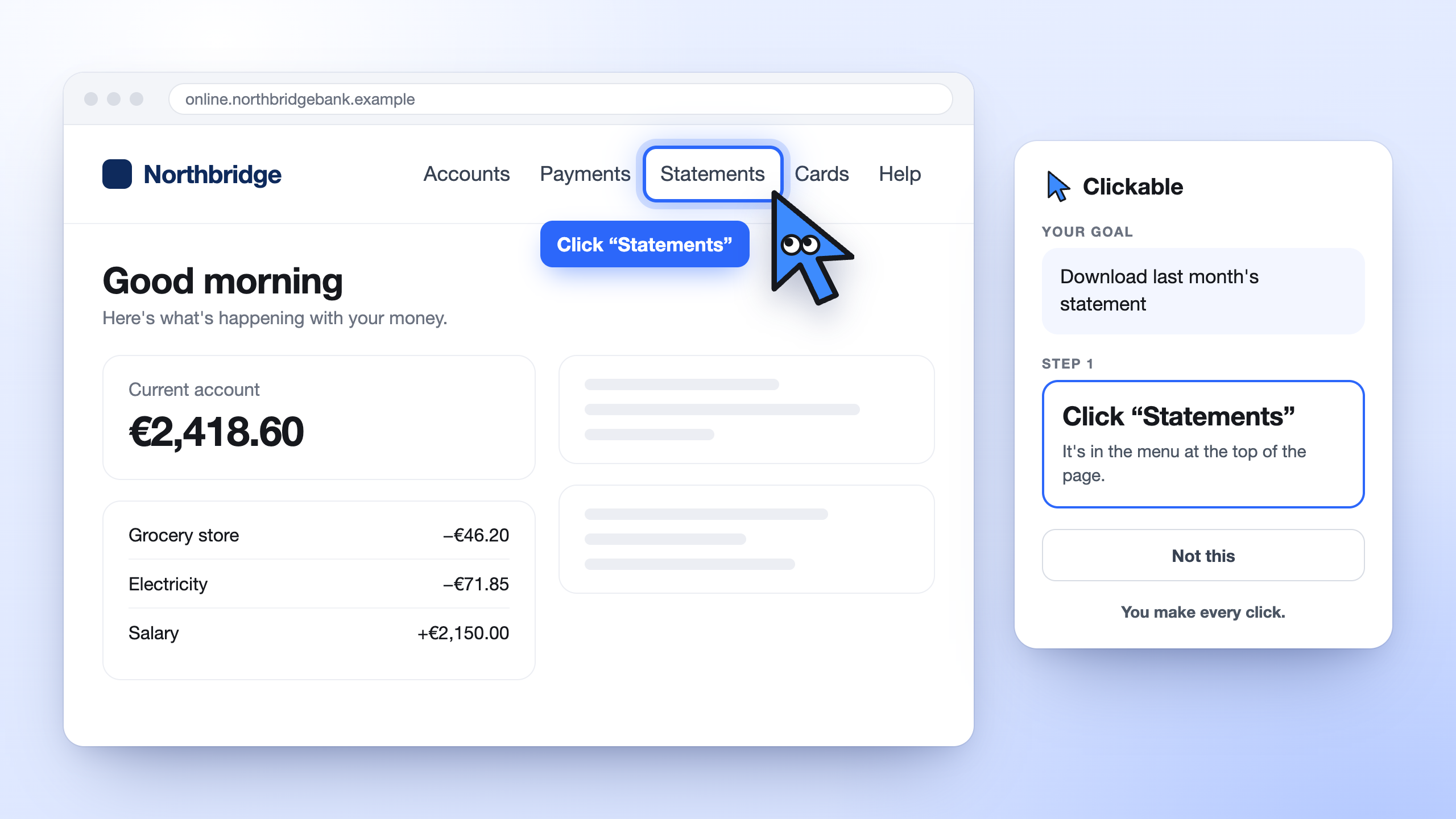
Clickable is a Chrome extension that shows you where to click on any website. You type what you want to do in your own words, and Clicky, a blue mouse pointer, highlights the next button, link or field with a short instruction. You make every click yourself: Clickable never clicks, types or pays for you.
Clickable is available now in the Chrome Web Store, with a free plan. Add Clickable to Chrome.
Clickable is for the moments when you know what you need to do online but can’t find where to do it: the setting hidden three menus deep, the form on a government website, the invoice somewhere in an account you rarely open.
What Clickable does
You open the Clickable panel next to the website you’re on and type a goal, such as “Download last month’s statement” or “Turn on subtitles”. Then:
- Clickable reads a short summary of the page: its buttons, links, fields and headings.
- It picks the one next thing to click and draws a blue ring around it, with a short note such as Click “Statements”.
- You click it yourself. Clickable notices the page change and shows the next step.
- It carries on, one step at a time, until the task is done.
If the next step depends on something only you know, Clicky asks a quick question first. If it points at the wrong thing, press Not this and it looks again. See how Clickable works in detail.
What Clickable doesn’t do
- It never acts for you. It doesn’t click, type, submit, sign or pay. That’s on purpose: on bank, tax and health websites, you should be the one making each move.
- It doesn’t read pages you haven’t asked about. It only reads a page while you’re running a task.
- It never sends what you type or your passwords. It only knows whether a field is filled or empty.
- It doesn’t give advice. Clickable shows you where to click, not what to answer. For tax, legal or money questions, check the official help or ask an adviser.
Who Clickable is for
Anyone who gets stuck on websites, and anyone who usually helps someone who does:
- Parents and grandparents checking a pension or booking a doctor’s appointment on their own.
- Small businesses finding invoices and settings in the tools they pay for.
- New employees learning the company’s software without asking a colleague for every step.
- Patients finding test results and appointments in health portals.
- Parents keeping up with school apps.
- Expats finding their way around government websites in a new country.
Where it works
Clickable works in Google Chrome on a computer, on most websites: government portals, banks, health services, shops, email and work software. It can’t read Chrome’s own pages (settings or a new tab), and it doesn’t yet see parts of a page shown inside an embedded frame.
How much it costs
| Plan | Best for | What you get | Price |
|---|---|---|---|
| Free | Trying it out, or getting stuck now and then | Up to 3 guided tasks a month | €0 |
| Plus | People who use complex websites every week | Up to 150 guided tasks a month and a more powerful guide for complex and slow websites | €7.99 a month, VAT included |
A task is one goal from start to finish, however many steps it takes. Everyone signs in with a free account first, using a code sent to your email: there’s no password to remember.
How Clickable is different
- AI agents that browse for you take over the page and act with your details. Clickable keeps you in charge and teaches you the website as you go.
- Asking family or screen sharing works when someone is free. Clickable is there whenever you need it, and you learn to do it yourself.
- Video tutorials go out of date when a website changes. Clickable reads the page as it is right now.
Compare Clickable with other ways to get help.
How to start
- Add Clickable to Chrome and pin it to the toolbar.
- Open a website and click the Clickable icon to open the panel.
- Sign in with Google, or with your email and the code we send you.
- Type what you want to do and press Guide me.
Want to know what happens to your data? Read Is Clickable safe?